
AI Home Design: Interior DecAI
Smart AI DEVArt & Design
4.61.30K Reviews
- Version
- 1.6.4
- Installs
- 10.00M
- Age Rating
- Everyone
Screenshots
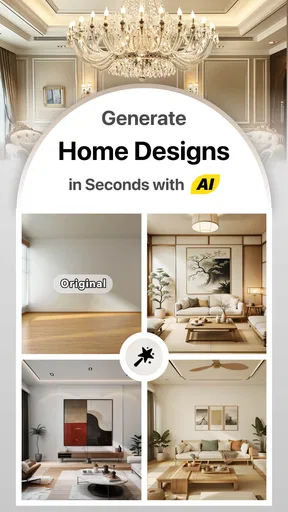


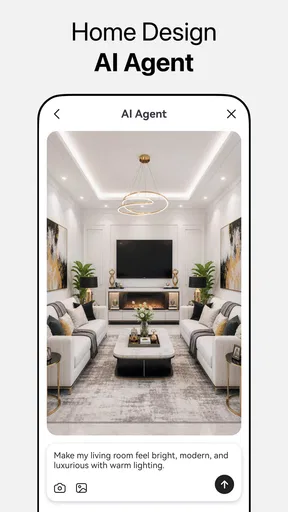
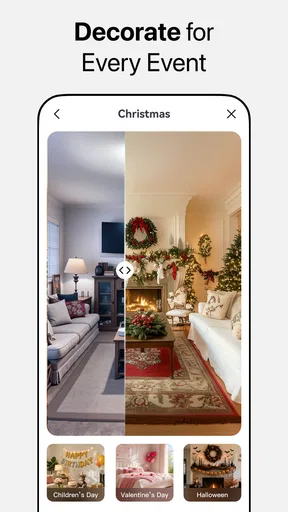
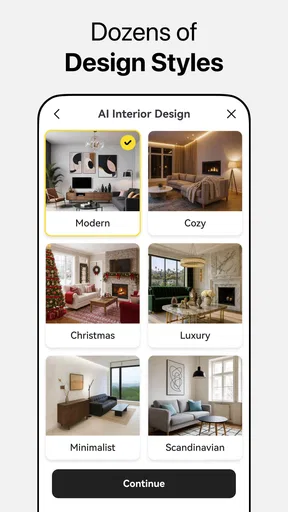
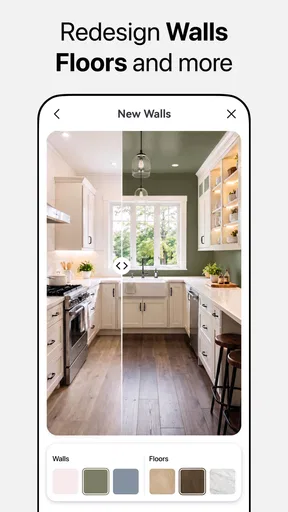
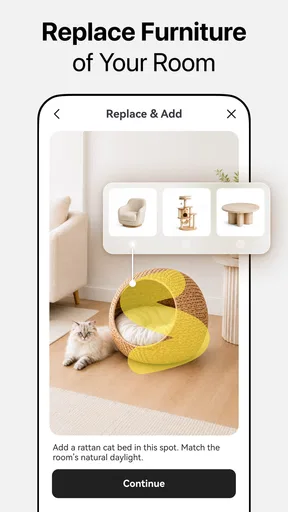
Our Review of AI Home Design: Interior DecAI
 Analysis by Appyee
I find that the first hurdle with a home-design app is often not choosing a style; it’s figuring out what the result can actually tell you. A polished room image can be useful for exploring mood, but it is not automatically a measured plan or a guarantee that a real sofa will fit. I’d approach AI Home Design: Interior DecAI as a visual brainstorming tool: it can help me compare directions before I spend time or money, while practical decisions still need checking in the room itself.
Start with a clear, useful room photo
When an AI design result looks odd, I would first check the image rather than assume the whole idea is unusable. A photo taken at an angle, with a doorway partly hidden or a large object blocking the view, gives any visual tool less to work with. I get more useful comparisons when I take a steady picture from a spot that shows the room’s main walls and leave the scene as uncluttered as practical. That is a simple preparation step, not a promise that every generated suggestion will match the room perfectly.
It also helps to decide what question I want the image to answer. “Could this room feel warmer?” is easier to judge than asking an AI to solve every choice at once. I might focus on a colour direction, a more open-feeling layout, or a change in overall style. Keeping one goal in mind makes it easier to tell whether a result is worth saving, and prevents a striking image from distracting me from the actual problem I wanted to solve.
Small setup checks that prevent wasted effort
Before trying a room image, I’d check that I am using the intended current app on a supported Android device. The current release is version 1.4.5, and Android use requires version 6.0 or later. The app is free to install, though it offers in-app purchases ranging from $1.99 to $99.99 per item, so I would look carefully at any purchase screen and make sure I understand what I’m choosing before confirming it.
If an upload or design step stalls, I’d use ordinary troubleshooting first: check that the device has a working internet connection, close and reopen the app, and try again with a clear image. If the same step still fails, I would avoid repeatedly tapping purchase or submit controls; first check whether the action already completed. These are sensible checks for a mobile app, not evidence that a particular error is common.
There is also a useful expectation check: a visual redesign is best treated as a concept, not a contractor’s drawing. I would not rely on an AI-generated picture for exact room dimensions, clearances, wiring, or building work. If a suggestion involves moving a bulky item, I’d measure the actual space and account for doors, walkways, and outlets separately. That distinction keeps a fun design exercise from turning into an expensive assumption.
Getting Started with AI Home Design: Interior DecAI
First things first, AI Home Design: Interior DecAI is available for both Android and iOS, so no matter your device, you’re covered. Downloading and installing the app is a breeze, and once you fire it up, you’re greeted with a sleek and user-friendly interface. The app kicks off with a quick tutorial to get you acquainted with its features, which is super helpful if you’re not a tech wizard.
Features That Wow
Now, let’s talk features. This app is packed with tools that make home design feel accessible to everyone. One of the coolest features is the augmented reality (AR) mode. You can literally visualize how a piece of furniture will look in your space before you buy it. Just point your camera at the room, choose a piece from the app’s extensive catalog, and voila! Instant makeover.
Another standout feature is the AI-powered design suggestions. The app analyzes your space and offers personalized recommendations on color schemes, furniture placement, and even decor items. It’s like having a little design guru whispering in your ear.
How to turn a generated idea into a useful decision
I would use the app in short, deliberate passes instead of asking it to settle the whole room in one go. For example, I might first explore a lighter, calmer look, save the version that feels closest, and then compare a second direction that changes the mood more substantially. That side-by-side habit is more useful than endlessly generating variations without a clear reason; it helps me notice which choice I actually prefer rather than simply picking the newest image.
For a realistic everyday scenario, imagine I’m rearranging a living room before buying a rug and replacing a tired accent chair. I can use a room concept to think through whether I want the space to feel brighter or more grounded, then take those ideas into the shop. I would still check rug dimensions against the floor and measure the chair’s footprint at home. The app can help narrow the visual direction, but the final fit depends on measurements and the products I can actually buy.
That is where this kind of app differs from a conventional mood board. A mood board is good for collecting colours and references, but it may leave me to imagine how those choices relate to my own room. A room-focused visual tool can make that comparison feel more immediate. On the other hand, a dedicated floor-planning or measurement tool is the better choice when I need precise dimensions, construction-ready plans, or reliable clearance calculations. I would treat the app as an early-stage design partner rather than a replacement for those tools.
Easy Peasy Design Process
What I love about this app is how it breaks down the design process into simple steps. Start by uploading a photo of your room, and the app creates a 3D model. From there, you can play around with different styles and layouts. Want to go modern chic? Or maybe a cozy rustic vibe? The app’s got you covered. You can even save your favorite designs and share them with friends for feedback.
Saved alternatives are especially handy when another person shares the decision. Rather than describing a vague idea in a message, I can show two different directions and ask a focused question: which one feels more comfortable, or which better suits the furniture we already own? I would keep the existing room’s fixed features in mind while judging the pictures. Windows, radiators, door swings, and awkward corners can matter more in daily life than a stylish finish in a concept image.
One practical trade-off is that the more I expect a generated scene to respect every real-world constraint, the more carefully I need to verify it myself. A design may be inspiring while still placing furniture in a way that would be inconvenient, or showing a combination I cannot reproduce exactly. I use the image to identify what I like—perhaps a colour relationship or a sense of openness—then translate that into choices that work with my actual room and budget.
Who will get the most from it
I think this is a good fit for renters, first-time decorators, and anyone who knows a room feels wrong but cannot yet explain why. It can make the blank-page stage less intimidating by giving visual directions to react to. It is also useful when I’m deciding whether to keep a room’s existing furniture and change the atmosphere around it, rather than immediately assuming everything needs replacing.
It is less suited to someone who needs exact architectural documentation, professional-grade measurements, or a guaranteed match to a specific product. A person planning a renovation with structural changes should use appropriate measurement and planning methods and consult qualified professionals where needed. Likewise, if I already have a precise design in mind and only need to draft a scaled floor plan, a specialist planning tool may be more direct than an AI-led visual experiment.
Because the app is free to install but includes optional purchases, I would also decide how much I want to explore before spending. The broad price range means purchase choices deserve a careful look rather than a casual tap. I’d begin with the experience available without paying, see whether its approach suits my needs, and only consider an in-app item if its purpose and cost are clear to me.
Community, inspiration, and a sensible filter
If you’re ever in need of some inspiration, the app’s community feature is a treasure trove. You can browse through user-uploaded designs, get inspired by trending styles, and even join discussions to share tips and tricks. It’s like being part of a creative design club.
I’d use community designs as prompts, not as a checklist of what my own home ought to look like. A popular style can be attractive in a picture yet awkward for a household with limited storage, pets, children, or a narrow walkway. When I see an idea I like, I try to identify the part that appeals to me—maybe the contrast, lighting impression, or balance of colour—and adapt that principle instead of copying the whole scene.
Moreover, the app regularly updates its content, so you’re always in the loop with the latest trends and design ideas. This keeps things fresh and exciting every time you log in.
When a design problem comes from somewhere else
Sometimes the app is not the source of the frustration. A room photo may simply be too dark or cramped to show its layout clearly, or the real challenge may be that the room has a fixed feature that limits furniture placement. In those cases, I would take another photo in better light or clarify the one design decision I’m trying to make. If the underlying issue is a tight passage or an awkward door, a generated makeover cannot remove that physical constraint.
If results feel inconsistent, I would avoid treating one image as the definitive answer. I’d compare a small number of distinct concepts, save the ones that communicate something useful, and judge them against real requirements: what must stay, how the room is used, and what I am genuinely willing to change. That approach makes the app more valuable as a source of options and less frustrating as a supposed final authority.
Smart AI DEV is the developer behind this art-and-design app. It has an average rating of 4.7 from around 79,000 ratings, with more than five million installs. It is rated for Everyone and was released on May 22, 2024. Those figures suggest it has found a broad audience, but they do not change the basic advice I’d give a friend: use the visuals to explore, then check practical decisions in person.
Final Thoughts
Overall, AI Home Design: Interior DecAI is a fantastic tool for anyone looking to revamp their living space without breaking the bank. Its intuitive design, coupled with powerful AI features, makes it a standout in the realm of home design apps. Whether you’re a seasoned decorator or a newbie, this app is sure to spark your creativity and help you turn your house into a home.
So, if you’re ready to embark on a design journey, give this app a whirl. It’s fun, easy, and who knows, you might just discover your inner interior designer. Happy decorating!
Privacy and Permissions
See what permissions an app requests and how it handles your data.
- Photos/Media/Files
- read the contents of your USB storage, modify or delete the contents of your USB storage
- Storage
- read the contents of your USB storage, modify or delete the contents of your USB storage
- Wi-Fi connection information
- view Wi-Fi connections
- Other
- view network connections, full network access, control vibration, prevent device from sleeping, read Google service configuration
Verdict
Strengths of AI Home Design: Interior DecAI
- User-friendly interface for quick navigation.
- Wide range of design templates available.
- Real-time 3D visualization feature.
- Seamless integration with smart home devices.
- Customizable color palettes and textures.
Limitations of AI Home Design: Interior DecAI
- Requires a constant internet connection.
- Limited free features; premium needed for full access.
- Occasional lag on older devices.
- Subscription model might be costly.
- Some design tools need improvement.
Other Releases by Smart AI DEV
View All
AI Photo Video Maker, Enhancer
Photography4.7

AI Photo Editor - BgMaster™
Photography4.6

Logo Maker - AI Art Design
Art & Design4.4

Coin Identifier - Coin Finder
Tools4.4
Similar Picks in This Category
View All
Canva: AI Photo & Video Editor
Canva4.8

PENUP – Drawing-sharing SNS
Samsung Electronics Co., Ltd.4.5

Crafto
Kutumb App4.6

Sketchbook
Sketchbook4.1

ibis Paint X
ibis inc.4.5

Adobe Express: AI Photo, Video
Adobe4.6
Frequently Asked Questions
What features does AI Home Design: Interior DecAI offer?
AI Home Design: Interior DecAI provides a range of features including virtual room planning, AI-driven decoration suggestions, and a vast library of furniture and decor items. Users can visualize different styles and layouts using augmented reality, making it easier to design and plan their spaces efficiently.
Is AI Home Design: Interior DecAI user-friendly for beginners?
Yes, AI Home Design: Interior DecAI is designed with an intuitive interface that caters to users of all levels. The app includes easy-to-follow tutorials and guides, making it accessible for beginners who are new to home design and want to experiment with different styles and ideas.
Does AI Home Design: Interior DecAI require an internet connection?
While some features of AI Home Design: Interior DecAI require an internet connection, such as downloading new decor items or accessing cloud-based designs, basic functionalities like room planning and saved designs can be accessed offline, ensuring flexibility in various scenarios.
Are there any in-app purchases or subscriptions in AI Home Design: Interior DecAI?
AI Home Design: Interior DecAI offers a free version with basic features, but to access premium elements like exclusive decor items and advanced AI suggestions, users can opt for in-app purchases or subscribe to a monthly plan. This allows for a more enriched designing experience.
Can AI Home Design: Interior DecAI support multiple room designs?
Absolutely, AI Home Design: Interior DecAI allows users to work on multiple room projects simultaneously. Each project can be saved separately, enabling users to experiment with various styles and layouts across different spaces, from living rooms to kitchens and beyond.
